The year is quickly coming to an end, and that means tech platforms are tripping over themselves to roll out their year-end recaps—all hoping to capture the virality that Spotify’s Wrapped year-in-review recap commands each year.
Already in December, we’ve seen Spotify Wrapped, Apple Music Replay, Amazon Music Delivered, and YouTube Recap, with more, like the popular Snapchat Recap, set to debut in the coming weeks. One of those debuts has occurred today, as well. Popular chat platform Discord has now released its personalized Wrapped-like recap: Discord Checkpoint. Here’s what to know about it and how to view yours.
Discord announced Discord Checkpoint 2025
Discord has announced that its personalized Discord Checkpoint recap will be rolling out to its users over the next few days. In previous years, Discord has announced a Checkpoint recap, but the start it released for it encompassed its global user base.
Discord Checkpoint 2025 is the first time the platform is offering a year-in-review personalized for each of its individual users, provided they were active on the service enough to generate a Checkpoint recap, and that their privacy settings allowed the use of their data.
What’s included in my Discord Checkpoint 2025?
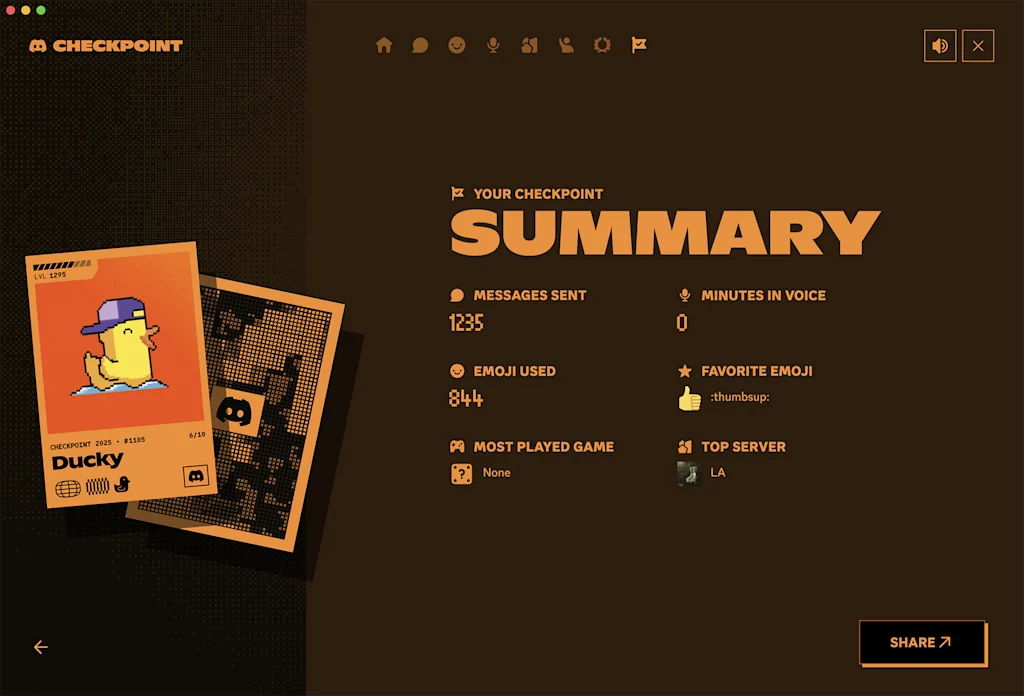
There are two main components of your Discord Checkpoint 2025. The first is a recap of your usage and interactions on the platform.
Here’s some of what your Discord Checkpoint 2025 will show you:
- How many messages you sent
- How many minutes in voice chat you spent
- How many emojis you posted
- What other Discord users you spent the most time with
- The servers you used the most
But Discord 2025 Checkpoint will also display one of 10 Checkpoint cards. These cards represent 10 different types of Discord users. Your card will come with a matching avatar you can choose to display on your profile so other Discord users can see if you’re in the same group.
How can I access my Discord Checkpoint 2025?
To access your Discord Checkpoint 2025, make sure you have the latest version of the desktop or mobile app.
If you are using the desktop app:
- Click the flag option in the top-right corner. Your Checkpoint will be displayed.
If you are using the mobile app:
- Tap the You tab in the bottom-right corner.
- Tap the Checkpoint banner. Your Checkpoint will be displayed.
Can I share my Discord Checkpoint 2025?
Yes, users can choose to share their Discord Checkpoint 2025.
To share your Discrod Checkpoint, tap the Share button on the Summary page and then choose where you’d like to share it.
Discord Checkpoint 2025 will be available to Discord users until January 15, 2026.
Related Posts

There are 25 artists who have been featured on a Taylor Swift song — here they all are
Taylor Swift and Sabrina Carpenter at the 2025 Grammys. John…

Endless growth, endless harm: Facebook is a symptom, not an outlier
The recent exposé Careless People, by former Facebook (now Meta)…

The massive heat wave, stretching from Maine to Texas, is slowing commuters down and making their waits miserable
The heat wave is slowing down transit systems across the…